Slides about Java EE 7 Platform Productivity++ and HTML5
Java Platform, Enterprise Edition 7 (Java EE 7) is a major update of Java Enterprise Edition scheduled to be final in Q2 2013. Java EE 7 is specified in JSR 342.
It is important to note that the Java EE 7 specification and its underlying specifications are still work in progress and as such timing and exact content are subject to change
More in https://glassfish.java.net/javaee7/
Copyright © 2012, Oracle and/or its affiliates. All rights reserved.
Showing posts with label Java. Show all posts
Showing posts with label Java. Show all posts
Thursday, May 30, 2013


Sunday, January 13, 2013
FIX for Oracle Java 7 Security Manager Bypass Vulnerability
Oracle launch new version of Java for Oracle Java 7 Security Manager Bypass Vulnerability
Any web browser using the Java 7 plug-in is affected. The Java Deployment Toolkit plug-in and Java Web Start can also be used as attack vectors.
Reports indicate this vulnerability is being actively exploited, and exploit code is publicly available.
Further technical details are available in Vulnerability Note VU#625617.
Source : http://www.us-cert.gov/cas/techalerts/TA13-010A.html
Systems Affected
Any system using Oracle Java 7 (1.7, 1.7.0) including- Java Platform Standard Edition 7 (Java SE 7)
- Java SE Development Kit (JDK 7)
- Java SE Runtime Environment (JRE 7)
Overview
A vulnerability in the way Java 7 restricts the permissions of Java applets could allow an attacker to execute arbitrary commands on a vulnerable system.Description
A vulnerability in the Java Security Manager allows a Java applet to grant itself permission to execute arbitrary code. An attacker could use social engineering techniques to entice a user to visit a link to a website hosting a malicious Java applet. An attacker could also compromise a legitimate web site and upload a malicious Java applet (a "drive-by download" attack).Any web browser using the Java 7 plug-in is affected. The Java Deployment Toolkit plug-in and Java Web Start can also be used as attack vectors.
Reports indicate this vulnerability is being actively exploited, and exploit code is publicly available.
Further technical details are available in Vulnerability Note VU#625617.
Impact
By convincing a user to load a malicious Java applet or Java Network Launching Protocol (JNLP) file, an attacker could execute arbitrary code on a vulnerable system with the privileges of the Java plug-in process.Solution
Install new version Java Runtime Environment 7 Update 11.Source : http://www.us-cert.gov/cas/techalerts/TA13-010A.html
Monday, November 5, 2012
Cross Platform Java Tool For Mobile App Developers
Today i find Codename One
The Codename One enables Java Developers to build true native applications for all mobile/tablet platforms (iOS, Android, Windows Phone 7, Blackberry etc).
 Development environments Codename One integrates seamlessly with the leading Java development environments (NetBeans
& Eclipse) using the Codename One IDE plugin. The plugin simplifies
& streamlines common tasks such as creating a new project,
running/debugging it in the simulator and sending it to the build
server.
Development environments Codename One integrates seamlessly with the leading Java development environments (NetBeans
& Eclipse) using the Codename One IDE plugin. The plugin simplifies
& streamlines common tasks such as creating a new project,
running/debugging it in the simulator and sending it to the build
server.
SDK
The Codename One SDK (Software Developer Kit) contains IDE plugins, our visual design tool, simulators for phones/tablets, our documentation/API and implementations for multiple platforms. Included in the SDK are simulators and build environment for iOS (java for iPhone/java for iPad), Android, Blackberry (RIM) and others (Windows Phone 7 Coming SOON!).
Ofical site and source: http://www.codenameone.com
The Codename One enables Java Developers to build true native applications for all mobile/tablet platforms (iOS, Android, Windows Phone 7, Blackberry etc).
SDK
The Codename One SDK (Software Developer Kit) contains IDE plugins, our visual design tool, simulators for phones/tablets, our documentation/API and implementations for multiple platforms. Included in the SDK are simulators and build environment for iOS (java for iPhone/java for iPad), Android, Blackberry (RIM) and others (Windows Phone 7 Coming SOON!).
Slides for an introductory talk about Codename One
Ofical site and source: http://www.codenameone.com
Friday, September 21, 2012
CrEME V4.12 with Netbeans IDE 7.2
My preferred IDE is Netbeans and I'm using Netbeans 7.2.
In NetBeans IDE 7.2, the Platform that use is CrE-ME V4.12 from NSIcom.
But it is not compatible with the Netbeans IDE.
Unfortunately the NSIcom is no longer supported by NetBeans due to
legal/licensing problems. If we want to continue using that, please continue
using version 6.9.1.
I contacted the NSIcom, and this was the response I got:
Subject :RE: CrEME V4.12
From:CerEm <cerem_software@012.net.il>
Use version 6.9.1.
Regards,
Rene, NSIcom Help Desk
-----Original Message-----
Sent: Saturday, September 15, 2012 3:28 PM
To: info-nsicom@inet.co.il
Subject: CrEME V4.12
How can I use CrEME V4.12 in NetBeans IDE 7.2, because of the following:
"Unfortunately the NSIcom is no longer supported by NetBeans due to
legal/licensing problems. If we want to continue using that, please continue
using version 6.9.1. "
From Netbeans:
Hi, Thank you for your interest in the NetBeans IDE documentation and your feedback. CrEme VM for Windows CE should work with NetBeans IDE 7.1 The NetBeans CDC Emulator Platform Setup Guide at http://netbeans.org/kb/71/javame/cdcemulator-setup.html applies to versions 6.9, 7.0, and 7.1 of the NetBeans IDE. CrEme VM for Windows CE is not expected to work with NetBeans IDE 7.2 which is reflected in the updated doc at http://netbeans.org/kb/docs/ javame/cdcemulator-setup.html Regards, Alyona Stashkova NetBeans Technical Documentation Team
Alternatives:
- Mysaifu JVM - Windows Mobile 2003 to Windows Mobile 6.0 (GNU Public License Version 2)
- WebSphere software - from IBM. The IDE is Eclipse
- phoneME Advanced software - from java.net
Saturday, September 1, 2012
Just one day after the correction of security breach, there is another even worse ...
From Dan Goodin [http://arstechnica.com]
Researchers said they've uncovered a flaw in the Java 7 update released by Oracle on Thursday that allows attackers to take complete control of end-user computers.
The flaw in Java 7 Update 7, which Oracle released to stop in-the-wild attacks that silently install malware on end-user machines, is the latest black eye for the security of the widely used software framework. It comes after revelations that Oracle learned of the vulnerabilities under attack in April, four months before the exploits were detected. Oracle has yet to explain the delay in fixing the bugs.
The latest bug "facilitates full Java sandbox bypass on latest Java 7 Update 7," Adam Gowdiak, the CEO of Poland-based Security Explorations, wrote in an e-mail to Ars. His team developed proof-of-concept code and delivered it on Friday to Oracle engineers. The discovery of the new critical bug was reported earlier by IDG News. There are no reports that it is being exploited online.
"The total hunt took about 2-3 hours," Gowdiak wrote. "It was done yesterday in the evening. The discovery was made [as] a result of a manual analysis of Java code (its implementation)."
Gowdiak declined to discuss technical details out of concern that they may make it easier for criminals to exploit the flaw in e-mail- or Web-based attacks. He said the discovery came "while trying to fix the proof-of-concept codes that stopped working after applying the recent Java patch."
An Oracle spokeswoman responding to a request for comment referred Ars to this advisory, which was published with Thursday's update. She and other representatives didn't respond to a follow-up e-mail informing her that the advisory was published before the most recent vulnerability was discovered.
This week's attack, and Oracle's lack of public response to them, has renewed calls by many—this reporter included—to remove Java from computers that don't use the cross-platform framework. Many programs that claim Java is required work fine, or almost as well, without the Oracle software, as confirmed by at least two Ars readers on Thursday. Even when it's mandatory for programs such as Adobe Photoshop, as one Mac-using Ars reader reported, users may want to remove Java plugins from their browsers if the websites they regularly visit don't require it. The removal advice has proved controversial to some, so Ars readers are encouraged to decide for themselves. (Oracle's official Twitter account for Java has also disagreed with the advice.)
Two of some 19 bugs that Gowdiak's firm reported in April were among those combined in the latest proof-of-concept attack to completely bypass the security sandbox Java relies on to ensure untrusted code can't access sensitive operating-system functions. Some of the remaining holes still haven't been plugged, and when linked to the latest discovered flaw, attackers could once again have the ability to escape the safety perimeter.
Said Gowdiak: "When combined with some of the April 2012 issues, the new issue allows [one] to achieve a complete [Java virtual machine] sandbox bypass in the environment of latest Java SE 7 Update 7 (version that was released on August 30, 2012)."
Source: http://arstechnica.com/security/2012/08/critical-bug-discovered-in-newest-java/
Researchers said they've uncovered a flaw in the Java 7 update released by Oracle on Thursday that allows attackers to take complete control of end-user computers.
The flaw in Java 7 Update 7, which Oracle released to stop in-the-wild attacks that silently install malware on end-user machines, is the latest black eye for the security of the widely used software framework. It comes after revelations that Oracle learned of the vulnerabilities under attack in April, four months before the exploits were detected. Oracle has yet to explain the delay in fixing the bugs.
The latest bug "facilitates full Java sandbox bypass on latest Java 7 Update 7," Adam Gowdiak, the CEO of Poland-based Security Explorations, wrote in an e-mail to Ars. His team developed proof-of-concept code and delivered it on Friday to Oracle engineers. The discovery of the new critical bug was reported earlier by IDG News. There are no reports that it is being exploited online.
 |
| Java "applets" run in a secure sandbox that prevents them from interacting with sensitive operating-system functions unless authorized. |
"The total hunt took about 2-3 hours," Gowdiak wrote. "It was done yesterday in the evening. The discovery was made [as] a result of a manual analysis of Java code (its implementation)."
Gowdiak declined to discuss technical details out of concern that they may make it easier for criminals to exploit the flaw in e-mail- or Web-based attacks. He said the discovery came "while trying to fix the proof-of-concept codes that stopped working after applying the recent Java patch."
An Oracle spokeswoman responding to a request for comment referred Ars to this advisory, which was published with Thursday's update. She and other representatives didn't respond to a follow-up e-mail informing her that the advisory was published before the most recent vulnerability was discovered.
This week's attack, and Oracle's lack of public response to them, has renewed calls by many—this reporter included—to remove Java from computers that don't use the cross-platform framework. Many programs that claim Java is required work fine, or almost as well, without the Oracle software, as confirmed by at least two Ars readers on Thursday. Even when it's mandatory for programs such as Adobe Photoshop, as one Mac-using Ars reader reported, users may want to remove Java plugins from their browsers if the websites they regularly visit don't require it. The removal advice has proved controversial to some, so Ars readers are encouraged to decide for themselves. (Oracle's official Twitter account for Java has also disagreed with the advice.)
Two of some 19 bugs that Gowdiak's firm reported in April were among those combined in the latest proof-of-concept attack to completely bypass the security sandbox Java relies on to ensure untrusted code can't access sensitive operating-system functions. Some of the remaining holes still haven't been plugged, and when linked to the latest discovered flaw, attackers could once again have the ability to escape the safety perimeter.
Said Gowdiak: "When combined with some of the April 2012 issues, the new issue allows [one] to achieve a complete [Java virtual machine] sandbox bypass in the environment of latest Java SE 7 Update 7 (version that was released on August 30, 2012)."
Source: http://arstechnica.com/security/2012/08/critical-bug-discovered-in-newest-java/
Friday, August 31, 2012
Security flaw resolved in versions of Java 7u7 and 6u35
Security Alert for CVE-2012-4681 Released
Oracle has just released Security Alert CVE-2012-4681 to address 3 distinct but related vulnerabilities and one security-in-depth issue affecting Java running in desktop browsers. These vulnerabilities are: CVE-2012-4681, CVE-2012-1682, CVE-2012-3136, and CVE-2012-0547. These vulnerabilities are not applicable to standalone Java desktop applications or Java running on servers, i.e. these vulnerabilities do not affect any Oracle server based software.
The Venturebeat says that the security company has released a list of all the vulnerabilities of the code and sent to Oracle in April. In response, Oracle said it had received the report and that the update should be released in June. However, continue to investigate other problems until August.
To check the version you have installed should re-enable Java in the browser, if the disabled are as indicated, and access Java test page.
Due to the high severity of these vulnerabilities, Oracle recommends that customers apply this Security Alert as soon as possible. Furthermore, note that the technical details of these vulnerabilities are widely available on the Internet and Oracle has received external reports that these vulnerabilities are being actively exploited in the wild.
For more information:
I recommend you uninstall all previous versions of Java (JRE and JDK), and install the new versions.
Source: https://blogs.oracle.com/security/entry/security_alert_for_cve_20121
Oracle has just released Security Alert CVE-2012-4681 to address 3 distinct but related vulnerabilities and one security-in-depth issue affecting Java running in desktop browsers. These vulnerabilities are: CVE-2012-4681, CVE-2012-1682, CVE-2012-3136, and CVE-2012-0547. These vulnerabilities are not applicable to standalone Java desktop applications or Java running on servers, i.e. these vulnerabilities do not affect any Oracle server based software.
Apparently, Oracle knew about the problem for months, and did nothing to resolve it. Who says researchers are security Security Explorations, have warned that indicate the company several months ago.
To check the version you have installed should re-enable Java in the browser, if the disabled are as indicated, and access Java test page.
Due to the high severity of these vulnerabilities, Oracle recommends that customers apply this Security Alert as soon as possible. Furthermore, note that the technical details of these vulnerabilities are widely available on the Internet and Oracle has received external reports that these vulnerabilities are being actively exploited in the wild.
- Developers should download the latest release at http://www.oracle.com/technetwork/java/javase/downloads/index.html
- Java users should download the latest release of JRE at http://java.com, and of course
- Windows users can take advantage of the Java Automatic Update to get the latest release.
For more information:
- The Advisory for Security Alert CVE-2012-4681 is located at http://www.oracle.com/technetwork/topics/security/alert-cve-2012-4681-1835715.html
- Users can verify that they’re running the most recent version of Java by visiting: http://java.com/en/download/installed.jsp
- Instructions on removing older (and less secure) versions of Java can be found at http://java.com/en/download/faq/remove_olderversions.xml
I recommend you uninstall all previous versions of Java (JRE and JDK), and install the new versions.
Source: https://blogs.oracle.com/security/entry/security_alert_for_cve_20121
Wednesday, August 29, 2012
Java 7 (1.7) JRE vulnerability
Are you vulnerable to the latest Java 0-day exploit?
Test to see if you're vulnerable.
The DeepEnd Research have been in contact with Michael Schierl
the Java expert who discovered a number of Java vulnerabilities,
including recent the Java Rhino CVE-2011-3544 / ZDI-11-305 and
CVE-2012-1723. We asked him to have a look at this last exploit .
Michael sent his detailed analysis, which we will publish in the nearest
future and a patch , which we offer on a per request basis today.
The Fix
There is no fix yet. The solution is disable Java plugin in all your browser to prevent malicious applets from running. The latest iteration of Java is version 1.7 revision 6. This is now the default version on Windows. Mac OS X still uses Java 1.6 (latest version: 1.6.33). Java 1.6.33 is NOT vulnerable to the latest 0-day exploit. However, I would not suggest that anybody downgrade from Java 1.7 to Java 1.6 as it is not yet known if version 1.6 is vulnerable to other flaws fixed in 1.7.
Firefox
Go to Tools - Add-ons - Plugins
Look for Java Deployment Toolkit and/or Java Platform SE. Disable them all.
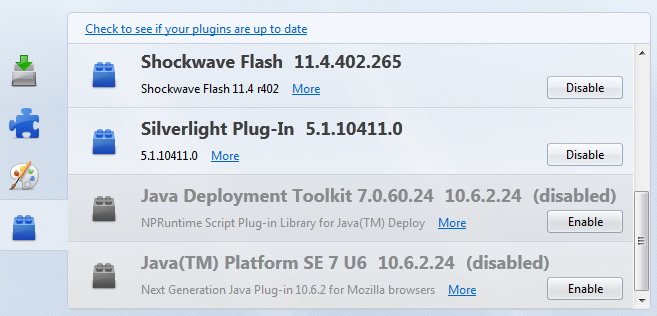 |
| Java disabled in Firefox |
Chrome
Go to Wrench - Settings and Show advanced settings... - Privacy and Content settings - Plug-ins - Disable individual plug-ins... - Java - disable. It is quite difficult to find!
 |
| Java enabled in Chrome |
Internet Explorer
Go to Tools - Manage Add-ons. Disable Java(tm) Plug-in SSV Helper and Java(tm) Plug-in 2 SSV Helper.

 |
| Java disabled in Internet Explorer 9 |
- http://research.zscaler.com/2012/08/are-you-vulnerable-to-latest-java-0-day.html
- http://www.deependresearch.org/2012/08/java-7-0-day-vulnerability-information.html
Thursday, August 16, 2012
Jaybird java.sql.SQLException: not yet implemented
As I said, I am creating an application for professional use. I'm programming in Java and use the Firebird database. Java and chose this database because it's all in Open Source, to run on Windows, Linux, and perhaps in OS X (not tried yet).
I was using jaybird-full-2.1.6.jar, to make connections to store images in BLOB fields. But each time he made the connection with specific parameters, always gave the following error:
The problem was in the library which had created the necessary methods.
The quickest solution is to use the latest version, jaybird-full-2.2.0.jar.
I was using jaybird-full-2.1.6.jar, to make connections to store images in BLOB fields. But each time he made the connection with specific parameters, always gave the following error:
java.sql.SQLException: not yet implemented
The problem was in the library which had created the necessary methods.
The quickest solution is to use the latest version, jaybird-full-2.2.0.jar.
Tuesday, August 7, 2012
Java PopupMenu
A popup menu to be used in the swing. This code is simplified. Can be used in a fnal class or within a class of its own.
public class GPaises extends javax.swing.JInternalFrame {I accept any comment or improvement. We're always learning.
private void createPopupMenu() {
try {
//Create the popup menu wiht icons .
JPopupMenu popup = new JPopupMenu();
JMenuItem menuItem;
menuItem = new JMenuItem("Cut, new ImageIcon(getClass().getResource("/gii/images/cut_red.png")));
menuItem.setHorizontalTextPosition(JMenuItem.RIGHT);
menuItem.addActionListener(menuListener);
popup.add(menuItem);
menuItem = new JMenuItem("Copy", new ImageIcon(getClass().getResource("/gii/images/page_copy.png")));
menuItem.setHorizontalTextPosition(JMenuItem.RIGHT);
menuItem.addActionListener(menuListener);
popup.add(menuItem);
menuItem = new JMenuItem("Paste", new ImageIcon(getClass().getResource("/gii/images/page_paste.png")));
menuItem.setHorizontalTextPosition(JMenuItem.RIGHT);
menuItem.addActionListener(menuListener);
popup.add(menuItem);
menuItem = new JMenuItem("Delete", new ImageIcon(getClass().getResource("/gii/images/page_delete.png")));
menuItem.setHorizontalTextPosition(JMenuItem.RIGHT);
menuItem.addActionListener(menuListener);
popup.add(menuItem);
popup.addSeparator();
menuItem = new JMenuItem("Add", new ImageIcon(getClass().getResource("/gii/images/picture_add.png")));
menuItem.setHorizontalTextPosition(JMenuItem.RIGHT);
menuItem.addActionListener(menuListener);
popup.add(menuItem);
menuItem = new JMenuItem("Save", new ImageIcon(getClass().getResource("/gii/images/picture_save.png")));
menuItem.setHorizontalTextPosition(JMenuItem.RIGHT);
menuItem.addActionListener(menuListener);
popup.add(menuItem);
//Add listener to the text area so the popup menu can come up.
MouseListener popupListener = new PopupListener(popup);
//ActionListener the choice of the popup, the event will buy the name / description in JMenuItem
ActionListener menuListener = new ActionListener() {
public void actionPerformed(ActionEvent event) {
if (event.getActionCommand().contentEquals("Cur")) {
copy();
} else if (event.getActionCommand().contentEquals("Copy")) {
copy();
} else if (event.getActionCommand().contentEquals("Paste")) {
paste();
} else if (event.getActionCommand().contentEquals("Delete")) {
clear();
} else if (event.getActionCommand().contentEquals("Add")) {
add();
} else if (event.getActionCommand().contentEquals("Save")) {
saveAs();
}
}
private void copy() {
//Copy action
}
private void paste() {
//Paste action
}
private void clear() {
//Clear action
}
private void add() {
//Add action
}
private void saveAs() {
//Save ass action
}
};
//Mouse popup Componunet listener
//Here we define which is the component that will invoke the popup
jLIcon.addMouseListener(popupListener);
} catch (Exception ex) {
//Error Exception
}
}
class PopupListener extends MouseAdapter {
JPopupMenu popup;
PopupListener(JPopupMenu popupMenu) {
popup = popupMenu;
}
public void mousePressed(MouseEvent e) {
maybeShowPopup(e);
}
public void mouseReleased(MouseEvent e) {
maybeShowPopup(e);
}
private void maybeShowPopup(MouseEvent e) {
if (e.isPopupTrigger()) {
popup.show(e.getComponent(),
e.getX(), e.getY());
}
}
}
}
Java Right mouse click event
This code allows an t right mouse click event. For So may we popup menu. Or other action we want.
So we can add multiple actions, such as a popup menu.
I accept any comment or improvement. We're always learning.
So we can add multiple actions, such as a popup menu.
private void EventMouseReleased(java.awt.event.MouseEvent evt) {
if (SwingUtilities.isRightMouseButton(evt)) {
//CODE
}
}
I accept any comment or improvement. We're always learning.
Monday, July 30, 2012
Netbeans: vector Obselete Collection
I created a vector in Netbeans when it displays the following error: "Obsolete Collection".
And I found it very strange. So I went to investigate the Netbeans forum. And found this.

Source: http://forums.netbeans.org/post-81854.html
And I found it very strange. So I went to investigate the Netbeans forum. And found this.
Vector is not deprecated BUT since Java 5 you have : ArrayList.
A Vector is synchronised, an ArrayList is not. So, if you don't use threads, you should use Arraylist instead of Vector.
Java 5 API : http://java.sun.com/j2se/1.5.0/docs/api/

Source: http://forums.netbeans.org/post-81854.html
Developing an application from scratch in Java
 I am developing an application from scratch in Java, which I will use the company where I work.
One of many reasons to use java, is because I can run Windows, Linux and Mac (never tested yet).
And I will put on my blog, source code of the application I'm developing. To help other programmers.
The questions and problems that I can and I'm having. Other developers also can have.
Until next time.
For the curious I'm using Netbeans + JDK 7.
Subscribe to:
Posts (Atom)