Free online Linux courses
that are either affiliated or not, generally offer self-study material
and do not provide academic credits. Some of the material that we bring
to you today is offered through schools' OpenCourseWare (OCW) projects
and can be found in PDF, video and screenshots formats.
Though
content is usually directed towards first time users of Linux systems,
the IBM and the University of California at Davis' offerings cater to
intermediate users. Students may need to have access to their own
computers running Linux in order to complete some lessons.
1. Building Dynamic Websites at Harvard University
This
online OCW course covers the knowledge needed to build a website.
Consisting of various video lectures, this tutorial instructs
individuals on how to build a website using Linux, as well as various
other frameworks. Students learn how to set up domains, design
databases, program with Java and build web pages using CSS (cascading
style sheets) and XHTML (extensible hypertext markup language). There
are sample projects in PDF format.
3. Computational Physics at Universiti Teknologi Malaysia
The
focus of this course is to teach students how to do physics
calculations using a computer as a calculator. They also learn Java
programming in a Linux environment. Through external website links, this
online course teaches students about using algorithms and working
within the Linux operating system.
4. The Embedded Linux Quick Start Guide through YouTube
The
free tutorial, which lasts less than an hour, provides learners with an
introduction to the Linux environment. Narrated by Chris Simmonds at a
2010 Embedded Linux Conference Europe, this video is the first in a
3-part series on Linux. Students learn the four basic elements of Linux:
toolchain, boot loader, kernel and user space.
5.Introduction to Linux at the University of South Carolina
A
simple introductory tutorial of slides in PDF format, this course
material shares basic information about what Linux is, the different
versions - or distributions - available, and how to use it. Files,
folders, pages, commands and writing script are some of the topics and
tools this course covers.
6. The Linux Effect: 20th Anniversary at The Open University
Offered
as an online podcast training, the Linux Effect offers information on
the Linux operating system and how it's advanced through the years.
Students learn the origin of Linux, how Linux is used in our daily lives
and the connection between Linux and cloud computing. Students need a
PDF viewer, such as Adobe Reader, to complete this course.
7. LPI Exam 201 Prep: Linux Kernel at IBM
In
this free tutorial series, users prepare for the Linux Professional
Institute Intermediate Level Administration (LPIC-2) Exam 201. The first
tutorial guides students through the components, compiling, patching
and customizing of a Linux kernel. Other topics in the series include
system maintenance, web services, hardware and troubleshooting.
Courtesy: Education-Portal
by: EFYTimes News
Showing posts with label Linux. Show all posts
Showing posts with label Linux. Show all posts
Tuesday, September 10, 2013


Saturday, July 13, 2013
Free webinar BackTrack and Kali Linux from CBT Nuggets trainer Keith Barker!
CBT Nuggets will be available webminar 30 minutes free on the BackTrack Linux and Kali.
The reason for this webinar to show the new training series on the BackTrack Linux and Kali.
The reason for this webinar to show the new training series on the BackTrack Linux and Kali.

Have
you ever wondered what Kali Linux is, and how it can help you? Find out
in a free 30-minute webinar with CBT Nuggets trainer Keith Barker!
Keith, creator of CBT Nuggets' "BackTrack and Kali Linux"
training series, will give an overview of these valuable pentesting
tools and will answer participants' questions. Don’t miss it!
What: BackTrack & Kali Linux webinar
When: 10 a.m. (Pacific Time), Wednesday, July 17
Register: To register, click here
Saturday, February 16, 2013
Install Fedora 18 with Mate Desktop Environment
I will explain how to install Fedora 18 with the Mate Desktop Environment.

The explanation involves the minimum installation and use the internet to install the desktop environment.
We will need:
After all the options have been chosen instalção and have completed the installation.
Let's log into the terminal and run the following commands:

The explanation involves the minimum installation and use the internet to install the desktop environment.
We will need:
- A desktop/laptop/notebook (lol)
- an image recorded on CD / DVD or usb fllash driver image already prepared.
- Internet connection
After all the options have been chosen instalção and have completed the installation.
Let's log into the terminal and run the following commands:
# yum install fedora-release-rawhide
# yum update -y
# reboot
# yum distro-sync -y
# reboot
# yum groupinstall "Mate Desktop"
Let's create a user account
# useradd USERNAME
#passwdUSERNAME
Once finalized we have to define what we want to boot the graphic environment.
# ln -sf /lib/systemd/system/graphical.target /etc/systemd/system/default.target
Sunday, January 13, 2013
FIX for Oracle Java 7 Security Manager Bypass Vulnerability
Oracle launch new version of Java for Oracle Java 7 Security Manager Bypass Vulnerability
Any web browser using the Java 7 plug-in is affected. The Java Deployment Toolkit plug-in and Java Web Start can also be used as attack vectors.
Reports indicate this vulnerability is being actively exploited, and exploit code is publicly available.
Further technical details are available in Vulnerability Note VU#625617.
Source : http://www.us-cert.gov/cas/techalerts/TA13-010A.html
Systems Affected
Any system using Oracle Java 7 (1.7, 1.7.0) including- Java Platform Standard Edition 7 (Java SE 7)
- Java SE Development Kit (JDK 7)
- Java SE Runtime Environment (JRE 7)
Overview
A vulnerability in the way Java 7 restricts the permissions of Java applets could allow an attacker to execute arbitrary commands on a vulnerable system.Description
A vulnerability in the Java Security Manager allows a Java applet to grant itself permission to execute arbitrary code. An attacker could use social engineering techniques to entice a user to visit a link to a website hosting a malicious Java applet. An attacker could also compromise a legitimate web site and upload a malicious Java applet (a "drive-by download" attack).Any web browser using the Java 7 plug-in is affected. The Java Deployment Toolkit plug-in and Java Web Start can also be used as attack vectors.
Reports indicate this vulnerability is being actively exploited, and exploit code is publicly available.
Further technical details are available in Vulnerability Note VU#625617.
Impact
By convincing a user to load a malicious Java applet or Java Network Launching Protocol (JNLP) file, an attacker could execute arbitrary code on a vulnerable system with the privileges of the Java plug-in process.Solution
Install new version Java Runtime Environment 7 Update 11.Source : http://www.us-cert.gov/cas/techalerts/TA13-010A.html
Saturday, December 15, 2012
Samba 4.0.0 now suport Microsoft Windows Active Directory
This release contains the best of all of Samba's technology parts, both a file server (that you can reasonably expect
to upgrade existing Samba 3.x releases to) and the AD domain controller work previously known as 'Samba4'.
Major enhancements in Samba 4.0.0 include:
Source: http://www.samba.org/samba/history/samba-4.0.0.html
Major enhancements in Samba 4.0.0 include:
- Active Directory service
- File Services
- DNS
- NTP
- Python Scripting Interface
Active Directory services
=========================

Samba 4.0 supports the server-side of the Active Directory logon
environment used by Windows 2000 and later, so we can do full domain
join and domain logon operations with these clients.

Our Domain Controller (DC) implementation includes our own built-in
LDAP server and Kerberos Key Distribution Center (KDC) as well as the
Samba3-like logon services provided over CIFS.  We correctly generate
the infamous Kerberos PAC, and include it with the Kerberos tickets we
issue.

When running an AD DC, you only need to run 'samba' (not smbd/nmbd/winbindd),
as the required services are co-coordinated by this master binary.
The tool to administer the Active Directory services is called 'samba-tool'.

A short guide to setting up Samba 4 as an AD DC can be found on the wiki:

  http://wiki.samba.org/index.php/Samba4/HOWTO
Source: http://www.samba.org/samba/history/samba-4.0.0.html
Wednesday, October 31, 2012
CrossOver FREE ONLY TODAY
CODEWEAVERS SOFTWARE FREE FOR DOWNLOAD FOR 24 HOURS ON OCTOBER 31, 2012
CEO unilaterally triggers giveaway after pledge tampering discovered;
CEO run down and flogged by employees following internal announcement
- CrossOver with 12 Months of Support is FREE for 24 hours starting at 00:00 to 23:59, October 31, 2012

Get CrossOver for FREE now! Here’s how:
- Sign up http://flock.codeweavers.com/
- Once the form is complete, we will provide you a link. You can then download CrossOver and use it immediately.
- Within the next week you will receive an email from us. Clicking the unique link in that email will create a free 12-month support entitlement on our server. Your support entitlement will give you full access to support and updates for the next year.
Flock The Vote Giveaway for Hurricane Sandy Survivors
If you or your loved ones are affected by Hurricane Sandy, please return to this page (sandy.codeweavers.com) starting on Thursday, November 1, 2012 to learn how to get your FREE copy of CrossOver. We will be maintaining this offer until ConEd gets the lights back on and the trains start running again. We are thinking about you, we hope that you and your loved ones are safe.If you have working Internet on October 31, 2012, please participate in the regular giveaway located at flock.codeweavers.com.
Thursday, September 13, 2012
New Oracle VM VirtualBox
The oracle has launched its new virtualization system, Oracle VM VirtualBox 4.2.
It is one of the VM systems that I use, because it works on Windows, Mac, Linux. And it's FREE (GPL version 2).
This system virtualization can compete directly with VMware and other virtualization at the machine itself (desktop). If we want to use in servers, VMware and Citrix are still the best.
Citrix has a system of free virtualization for servers that are used by many companies is known internationally.
 Increased efficiency:
Making it easier and more efficient to manage larger numbers of similar
virtual machines, Oracle VM VirtualBox 4.2's new VM Group feature
enables grouping of VMs. This allows administrators or users to operate
on any number of VMs all at once, through a graphical user interface,
APIs, and command line tools.
Increased efficiency:
Making it easier and more efficient to manage larger numbers of similar
virtual machines, Oracle VM VirtualBox 4.2's new VM Group feature
enables grouping of VMs. This allows administrators or users to operate
on any number of VMs all at once, through a graphical user interface,
APIs, and command line tools.
Downloads
Source: http://www.oracle.com/us/corporate/press/1842885
It is one of the VM systems that I use, because it works on Windows, Mac, Linux. And it's FREE (GPL version 2).
This system virtualization can compete directly with VMware and other virtualization at the machine itself (desktop). If we want to use in servers, VMware and Citrix are still the best.
Citrix has a system of free virtualization for servers that are used by many companies is known internationally.
Increased Efficiency, Network Enhancements and Broader Platform Support
 Increased efficiency:
Making it easier and more efficient to manage larger numbers of similar
virtual machines, Oracle VM VirtualBox 4.2's new VM Group feature
enables grouping of VMs. This allows administrators or users to operate
on any number of VMs all at once, through a graphical user interface,
APIs, and command line tools.
Increased efficiency:
Making it easier and more efficient to manage larger numbers of similar
virtual machines, Oracle VM VirtualBox 4.2's new VM Group feature
enables grouping of VMs. This allows administrators or users to operate
on any number of VMs all at once, through a graphical user interface,
APIs, and command line tools.
More flexible VM startup options:
VMs that don't need user interaction can now be started within Oracle
VM VirtualBox the same way as standard VMs. Virtual machines of all
types can be set to start automatically after the host system is booted,
allowing virtual machines to be managed similarly to other host
services.
Networking improvements:
 The virtual network card in Oracle VM VirtualBox now supports VLAN tagging, allowing VMs to participate in VLAN environments.
With an increase in the maximum
number of network cards per VM from eight to 36, Oracle VM VirtualBox
4.2 can be used to simulate complex networks without the need to procure
costly hardware.
New network bandwidth controls
have been added, and are designed to prevent any VM from taking more
than its allocated share of network traffic.
 The virtual network card in Oracle VM VirtualBox now supports VLAN tagging, allowing VMs to participate in VLAN environments.
New platform support: Oracle VM VirtualBox 4.2 adds support for Windows 8, Mac OS X 10.8 "Mountain Lion," and Oracle Linux 6.3.
Supporting Quote
"As the only free, open source
virtualization software that supports Windows, Mac, Linux and Oracle
Solaris platforms, users can install Oracle VM VirtualBox 4.2 on their
preferred host platform and run a huge variety of guest operating
systems in virtual machines," said Wim Coekaerts, Oracle senior vice
president of Linux and Virtualization Engineering. "Oracle VM VirtualBox
4.2 makes it even easier and more efficient for users to manage virtual
machines with VM Groups, new startup options, and new network tuning
capabilities."
Downloads
- VirtualBox 4.2 for Windows hosts x86/amd64
- VirtualBox 4.2 for OS X hosts x86/amd64
- VirtualBox 4.2 for Linux hosts
- VirtualBox 4.2 for Solaris hosts x86/amd64
- VirtualBox 4.2 Oracle VM VirtualBox Extension Pack All platforms
- VirtualBox 4.2 Software Developer Kit (SDK) All platforms
Source: http://www.oracle.com/us/corporate/press/1842885
Saturday, September 1, 2012
Just one day after the correction of security breach, there is another even worse ...
From Dan Goodin [http://arstechnica.com]
Researchers said they've uncovered a flaw in the Java 7 update released by Oracle on Thursday that allows attackers to take complete control of end-user computers.
The flaw in Java 7 Update 7, which Oracle released to stop in-the-wild attacks that silently install malware on end-user machines, is the latest black eye for the security of the widely used software framework. It comes after revelations that Oracle learned of the vulnerabilities under attack in April, four months before the exploits were detected. Oracle has yet to explain the delay in fixing the bugs.
The latest bug "facilitates full Java sandbox bypass on latest Java 7 Update 7," Adam Gowdiak, the CEO of Poland-based Security Explorations, wrote in an e-mail to Ars. His team developed proof-of-concept code and delivered it on Friday to Oracle engineers. The discovery of the new critical bug was reported earlier by IDG News. There are no reports that it is being exploited online.
"The total hunt took about 2-3 hours," Gowdiak wrote. "It was done yesterday in the evening. The discovery was made [as] a result of a manual analysis of Java code (its implementation)."
Gowdiak declined to discuss technical details out of concern that they may make it easier for criminals to exploit the flaw in e-mail- or Web-based attacks. He said the discovery came "while trying to fix the proof-of-concept codes that stopped working after applying the recent Java patch."
An Oracle spokeswoman responding to a request for comment referred Ars to this advisory, which was published with Thursday's update. She and other representatives didn't respond to a follow-up e-mail informing her that the advisory was published before the most recent vulnerability was discovered.
This week's attack, and Oracle's lack of public response to them, has renewed calls by many—this reporter included—to remove Java from computers that don't use the cross-platform framework. Many programs that claim Java is required work fine, or almost as well, without the Oracle software, as confirmed by at least two Ars readers on Thursday. Even when it's mandatory for programs such as Adobe Photoshop, as one Mac-using Ars reader reported, users may want to remove Java plugins from their browsers if the websites they regularly visit don't require it. The removal advice has proved controversial to some, so Ars readers are encouraged to decide for themselves. (Oracle's official Twitter account for Java has also disagreed with the advice.)
Two of some 19 bugs that Gowdiak's firm reported in April were among those combined in the latest proof-of-concept attack to completely bypass the security sandbox Java relies on to ensure untrusted code can't access sensitive operating-system functions. Some of the remaining holes still haven't been plugged, and when linked to the latest discovered flaw, attackers could once again have the ability to escape the safety perimeter.
Said Gowdiak: "When combined with some of the April 2012 issues, the new issue allows [one] to achieve a complete [Java virtual machine] sandbox bypass in the environment of latest Java SE 7 Update 7 (version that was released on August 30, 2012)."
Source: http://arstechnica.com/security/2012/08/critical-bug-discovered-in-newest-java/
Researchers said they've uncovered a flaw in the Java 7 update released by Oracle on Thursday that allows attackers to take complete control of end-user computers.
The flaw in Java 7 Update 7, which Oracle released to stop in-the-wild attacks that silently install malware on end-user machines, is the latest black eye for the security of the widely used software framework. It comes after revelations that Oracle learned of the vulnerabilities under attack in April, four months before the exploits were detected. Oracle has yet to explain the delay in fixing the bugs.
The latest bug "facilitates full Java sandbox bypass on latest Java 7 Update 7," Adam Gowdiak, the CEO of Poland-based Security Explorations, wrote in an e-mail to Ars. His team developed proof-of-concept code and delivered it on Friday to Oracle engineers. The discovery of the new critical bug was reported earlier by IDG News. There are no reports that it is being exploited online.
 |
| Java "applets" run in a secure sandbox that prevents them from interacting with sensitive operating-system functions unless authorized. |
"The total hunt took about 2-3 hours," Gowdiak wrote. "It was done yesterday in the evening. The discovery was made [as] a result of a manual analysis of Java code (its implementation)."
Gowdiak declined to discuss technical details out of concern that they may make it easier for criminals to exploit the flaw in e-mail- or Web-based attacks. He said the discovery came "while trying to fix the proof-of-concept codes that stopped working after applying the recent Java patch."
An Oracle spokeswoman responding to a request for comment referred Ars to this advisory, which was published with Thursday's update. She and other representatives didn't respond to a follow-up e-mail informing her that the advisory was published before the most recent vulnerability was discovered.
This week's attack, and Oracle's lack of public response to them, has renewed calls by many—this reporter included—to remove Java from computers that don't use the cross-platform framework. Many programs that claim Java is required work fine, or almost as well, without the Oracle software, as confirmed by at least two Ars readers on Thursday. Even when it's mandatory for programs such as Adobe Photoshop, as one Mac-using Ars reader reported, users may want to remove Java plugins from their browsers if the websites they regularly visit don't require it. The removal advice has proved controversial to some, so Ars readers are encouraged to decide for themselves. (Oracle's official Twitter account for Java has also disagreed with the advice.)
Two of some 19 bugs that Gowdiak's firm reported in April were among those combined in the latest proof-of-concept attack to completely bypass the security sandbox Java relies on to ensure untrusted code can't access sensitive operating-system functions. Some of the remaining holes still haven't been plugged, and when linked to the latest discovered flaw, attackers could once again have the ability to escape the safety perimeter.
Said Gowdiak: "When combined with some of the April 2012 issues, the new issue allows [one] to achieve a complete [Java virtual machine] sandbox bypass in the environment of latest Java SE 7 Update 7 (version that was released on August 30, 2012)."
Source: http://arstechnica.com/security/2012/08/critical-bug-discovered-in-newest-java/
Friday, August 31, 2012
Security flaw resolved in versions of Java 7u7 and 6u35
Security Alert for CVE-2012-4681 Released
Oracle has just released Security Alert CVE-2012-4681 to address 3 distinct but related vulnerabilities and one security-in-depth issue affecting Java running in desktop browsers. These vulnerabilities are: CVE-2012-4681, CVE-2012-1682, CVE-2012-3136, and CVE-2012-0547. These vulnerabilities are not applicable to standalone Java desktop applications or Java running on servers, i.e. these vulnerabilities do not affect any Oracle server based software.
The Venturebeat says that the security company has released a list of all the vulnerabilities of the code and sent to Oracle in April. In response, Oracle said it had received the report and that the update should be released in June. However, continue to investigate other problems until August.
To check the version you have installed should re-enable Java in the browser, if the disabled are as indicated, and access Java test page.
Due to the high severity of these vulnerabilities, Oracle recommends that customers apply this Security Alert as soon as possible. Furthermore, note that the technical details of these vulnerabilities are widely available on the Internet and Oracle has received external reports that these vulnerabilities are being actively exploited in the wild.
For more information:
I recommend you uninstall all previous versions of Java (JRE and JDK), and install the new versions.
Source: https://blogs.oracle.com/security/entry/security_alert_for_cve_20121
Oracle has just released Security Alert CVE-2012-4681 to address 3 distinct but related vulnerabilities and one security-in-depth issue affecting Java running in desktop browsers. These vulnerabilities are: CVE-2012-4681, CVE-2012-1682, CVE-2012-3136, and CVE-2012-0547. These vulnerabilities are not applicable to standalone Java desktop applications or Java running on servers, i.e. these vulnerabilities do not affect any Oracle server based software.
Apparently, Oracle knew about the problem for months, and did nothing to resolve it. Who says researchers are security Security Explorations, have warned that indicate the company several months ago.
To check the version you have installed should re-enable Java in the browser, if the disabled are as indicated, and access Java test page.
Due to the high severity of these vulnerabilities, Oracle recommends that customers apply this Security Alert as soon as possible. Furthermore, note that the technical details of these vulnerabilities are widely available on the Internet and Oracle has received external reports that these vulnerabilities are being actively exploited in the wild.
- Developers should download the latest release at http://www.oracle.com/technetwork/java/javase/downloads/index.html
- Java users should download the latest release of JRE at http://java.com, and of course
- Windows users can take advantage of the Java Automatic Update to get the latest release.
For more information:
- The Advisory for Security Alert CVE-2012-4681 is located at http://www.oracle.com/technetwork/topics/security/alert-cve-2012-4681-1835715.html
- Users can verify that they’re running the most recent version of Java by visiting: http://java.com/en/download/installed.jsp
- Instructions on removing older (and less secure) versions of Java can be found at http://java.com/en/download/faq/remove_olderversions.xml
I recommend you uninstall all previous versions of Java (JRE and JDK), and install the new versions.
Source: https://blogs.oracle.com/security/entry/security_alert_for_cve_20121
Wednesday, August 29, 2012
Java 7 (1.7) JRE vulnerability
Are you vulnerable to the latest Java 0-day exploit?
Test to see if you're vulnerable.
The DeepEnd Research have been in contact with Michael Schierl
the Java expert who discovered a number of Java vulnerabilities,
including recent the Java Rhino CVE-2011-3544 / ZDI-11-305 and
CVE-2012-1723. We asked him to have a look at this last exploit .
Michael sent his detailed analysis, which we will publish in the nearest
future and a patch , which we offer on a per request basis today.
The Fix
There is no fix yet. The solution is disable Java plugin in all your browser to prevent malicious applets from running. The latest iteration of Java is version 1.7 revision 6. This is now the default version on Windows. Mac OS X still uses Java 1.6 (latest version: 1.6.33). Java 1.6.33 is NOT vulnerable to the latest 0-day exploit. However, I would not suggest that anybody downgrade from Java 1.7 to Java 1.6 as it is not yet known if version 1.6 is vulnerable to other flaws fixed in 1.7.
Firefox
Go to Tools - Add-ons - Plugins
Look for Java Deployment Toolkit and/or Java Platform SE. Disable them all.
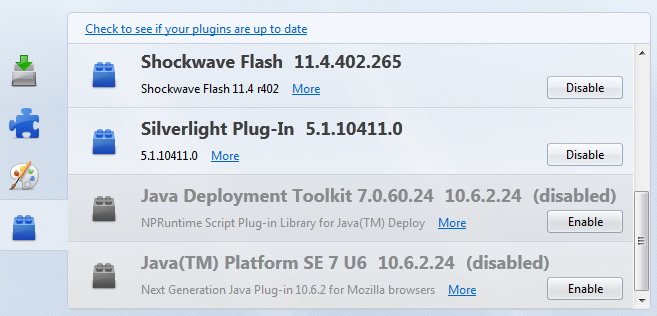 |
| Java disabled in Firefox |
Chrome
Go to Wrench - Settings and Show advanced settings... - Privacy and Content settings - Plug-ins - Disable individual plug-ins... - Java - disable. It is quite difficult to find!
 |
| Java enabled in Chrome |
Internet Explorer
Go to Tools - Manage Add-ons. Disable Java(tm) Plug-in SSV Helper and Java(tm) Plug-in 2 SSV Helper.

 |
| Java disabled in Internet Explorer 9 |
- http://research.zscaler.com/2012/08/are-you-vulnerable-to-latest-java-0-day.html
- http://www.deependresearch.org/2012/08/java-7-0-day-vulnerability-information.html
Thursday, July 19, 2012
New VideoLAN (VLC) version 2.0.3
The new VLC is out, but is only for mac :-( .

VideoLAN and the VLC development released VLC 2.0.3, this update mainly targets the Mac OS X platform. Most improvements are for Mac OS X Mountain Lion, but also this update includes many bug fixes.
Finally,VLC Media Player 2.0.3 includes updates for 18 translations and adds support for Uzbek and Marathi. Bugs preventing the activation of the Gaelic and Thai translations in the earlier version were resolved.
Official Downloads of VLC media player
Windows
Get VLC for Windows
Get VLC for Mac OS X
Get VLC for iOS
Sources
You can also directly get the source code.
GNU/Linux
Get VLC for Debian GNU/Linux
Get VLC for Ubuntu
Get VLC for Mint
Get VLC for openSUSE
Get VLC for Gentoo Linux
Get VLC for Fedora
Get VLC for Arch Linux
Get VLC for Slackware Linux
Get VLC for Mandriva Linux
Get VLC for ALT Linux
Get VLC for Red Hat Enterprise Linux
Other OS
Get VLC for FreeBSD
Get VLC for NetBSD
Get VLC for OpenBSD
Get VLC for Solaris
Get VLC for Android
Get VLC for QNX
Get VLC for Syllable
Get VLC for OS/2

VideoLAN and the VLC development released VLC 2.0.3, this update mainly targets the Mac OS X platform. Most improvements are for Mac OS X Mountain Lion, but also this update includes many bug fixes.
Finally,VLC Media Player 2.0.3 includes updates for 18 translations and adds support for Uzbek and Marathi. Bugs preventing the activation of the Gaelic and Thai translations in the earlier version were resolved.
Official Downloads of VLC media player
Windows
Get VLC for Windows
Get VLC for Mac OS X
Get VLC for iOS
Sources
You can also directly get the source code.
GNU/Linux
Get VLC for Debian GNU/Linux
Get VLC for Ubuntu
Get VLC for Mint
Get VLC for openSUSE
Get VLC for Gentoo Linux
Get VLC for Fedora
Get VLC for Arch Linux
Get VLC for Slackware Linux
Get VLC for Mandriva Linux
Get VLC for ALT Linux
Get VLC for Red Hat Enterprise Linux
Other OS
Get VLC for FreeBSD
Get VLC for NetBSD
Get VLC for OpenBSD
Get VLC for Solaris
Get VLC for Android
Get VLC for QNX
Get VLC for Syllable
Get VLC for OS/2
Sunday, July 1, 2012
From Fedora Linux to MAC OS X Snow Leopard 10.6.3
For more than four years that only work with the Linux Operating System on my personal computers (Desktop and Netbook). I have worked with Linux since Red Hat 5, which gave major headaches, due to lack of incompatabilidade with printers and other peripherals at the time.
I tried other distros as:
And I chose to use Fedora and Centos computers and laptops to servers. And to date I am realy satisfied. Because I have the freedom to customize my way and the variety of software is available free (free like a beer). Both on a personal level, as development and security.
As is clear also I have to use Windows (at work and at home) because some applications that only exist in Microsoft systems. But do not use a dual-boot. I use virtual machines with Windows virtualized Oracle Virtual Box. That day is also free for domestic and business users due to VMWare (thanks VMWare).
Since I am working with the new Gnome 3, I'm hating Gnome. So I'll try it the Mac OS X. Because unlike Microsoft, Gnome, KDE, ... . The graphical environment keeps the same.
And here begins my story with Apple Mac OS X Snow Leopard.
I had exprimentado MAC OS X 10.5. But I have not had much time to try it the operating system, a technical and personal level.
And then I went on a Saturday to buy an ORIGINAL RETAIL MAC OS X Snow Leopard 10.6.3 (not a copy or download from torrent), the store Worten. I bought a Family Pack for five computers.
The difference between a single and a family pack is none. Both are completely the same. Because there are no limitations of facilities, is just a legal issue. Because I want to install on multiple devices.
I came home with my Mac OS X Snow Leopard Retail 10.6.3.
That only cost 39.90 euros in the physical store.
In Apple online store costs 59.00 euros.
I tried other distros as:
- Red Har 6.2
- WinLinux 2000
- Corel Linux
- Red Hat 7.1
- Red Hat 8
- Fedora Core 1 - 4
- Open-Suse
 | |||
| Full Linux CD from magazines |
 |
| Some of my Microsoft OS licenses of my computers |
Since I am working with the new Gnome 3, I'm hating Gnome. So I'll try it the Mac OS X. Because unlike Microsoft, Gnome, KDE, ... . The graphical environment keeps the same.
 |
| Worten Store Mac OS X |
And here begins my story with Apple Mac OS X Snow Leopard.
I had exprimentado MAC OS X 10.5. But I have not had much time to try it the operating system, a technical and personal level.
And then I went on a Saturday to buy an ORIGINAL RETAIL MAC OS X Snow Leopard 10.6.3 (not a copy or download from torrent), the store Worten. I bought a Family Pack for five computers.
The difference between a single and a family pack is none. Both are completely the same. Because there are no limitations of facilities, is just a legal issue. Because I want to install on multiple devices.
 |
| Mac OS X Apple Store |
I came home with my Mac OS X Snow Leopard Retail 10.6.3.
That only cost 39.90 euros in the physical store.
In Apple online store costs 59.00 euros.
Snow Leopard Family Pack
physical store (39,90) vs Apple store (59,90)
physical store wins
 |
| Mac OS X Snow Leopard prof |
Package Mac OS X Snow Leopard 10.6.3 Retail
 |
| Inside package os Mac OS X Retail 10.6.3 |
Subscribe to:
Posts (Atom)