Showing posts with label Mac OS X. Show all posts

Sunday, January 13, 2013

FIX for Oracle Java 7 Security Manager Bypass Vulnerability

Oracle launch  new version of Java for Oracle Java 7 Security Manager Bypass Vulnerability

Systems Affected

Any system using Oracle Java 7 (1.7, 1.7.0) including
  • Java Platform Standard Edition 7 (Java SE 7)
  • Java SE Development Kit (JDK 7)
  • Java SE Runtime Environment (JRE 7)
All versions of Java 7 through update 10 are affected.  Web browsers using the Java 7 plug-in are at high risk.

Overview

A vulnerability in the way Java 7 restricts the permissions of Java applets could allow an attacker to execute arbitrary commands on a vulnerable system.

Description

A vulnerability in the Java Security Manager allows a Java applet to grant itself permission to execute arbitrary code. An attacker could use social engineering techniques to entice a user to visit a link to a website hosting a malicious Java applet. An attacker could also compromise a legitimate web site and upload a malicious Java applet (a "drive-by download" attack).
Any web browser using the Java 7 plug-in is affected. The Java Deployment Toolkit plug-in and Java Web Start can also be used as attack vectors.
Reports indicate this vulnerability is being actively exploited, and exploit code is publicly available.
Further technical details are available in Vulnerability Note VU#625617.

Impact

By convincing a user to load a malicious Java applet or Java Network Launching Protocol (JNLP) file, an attacker could execute arbitrary code on a vulnerable system with the privileges of the Java plug-in process.

Solution

Install new version Java Runtime Environment 7 Update 11.


Source :  http://www.us-cert.gov/cas/techalerts/TA13-010A.html

Wednesday, October 31, 2012

CrossOver FREE ONLY TODAY


CODEWEAVERS SOFTWARE FREE FOR DOWNLOAD FOR 24 HOURS ON OCTOBER 31, 2012
CEO unilaterally triggers giveaway after pledge tampering discovered;
CEO run down and flogged by employees following internal announcement

  • CrossOver with 12 Months of Support is FREE for 24 hours starting at 00:00 to 23:59, October 31, 2012
http://media.codeweavers.com/pub/crossover/marketing/flock-the-vote-bar.png

Get CrossOver for FREE now! Here’s how:
  1. Sign up http://flock.codeweavers.com/
  2. Once the form is complete, we will provide you a link. You can then download CrossOver and use it immediately.
  3. Within the next week you will receive an email from us. Clicking the unique link in that email will create a free 12-month support entitlement on our server. Your support entitlement will give you full access to support and updates for the next year.


Flock The Vote Giveaway for Hurricane Sandy Survivors

If you or your loved ones are affected by Hurricane Sandy, please return to this page (sandy.codeweavers.com) starting on Thursday, November 1, 2012 to learn how to get your FREE copy of CrossOver. We will be maintaining this offer until ConEd gets the lights back on and the trains start running again. We are thinking about you, we hope that you and your loved ones are safe.
If you have working Internet on October 31, 2012, please participate in the regular giveaway located at flock.codeweavers.com.


Thursday, September 13, 2012

New Oracle VM VirtualBox

The oracle has launched its new virtualization system, Oracle VM VirtualBox 4.2.

It is one of the VM systems that I use, because it works on Windows, Mac, Linux. And it's FREE (GPL version 2).

This system virtualization can compete directly with VMware and other virtualization at the machine itself (desktop). If we want to use in servers, VMware and Citrix are still the best.

Citrix has a system of free virtualization for servers that are used by many companies is known internationally.


Increased Efficiency, Network Enhancements and Broader Platform Support

Oracle VM VirtualBox 4.2 GroupIncreased efficiency: Making it easier and more efficient to manage larger numbers of similar virtual machines, Oracle VM VirtualBox 4.2's new VM Group feature enables grouping of VMs. This allows administrators or users to operate on any number of VMs all at once, through a graphical user interface, APIs, and command line tools.
More flexible VM startup options: VMs that don't need user interaction can now be started within Oracle VM VirtualBox the same way as standard VMs. Virtual machines of all types can be set to start automatically after the host system is booted, allowing virtual machines to be managed similarly to other host services.
 
Networking improvements:
With an increase in the maximum number of network cards per VM from eight to 36, Oracle VM VirtualBox 4.2 can be used to simulate complex networks without the need to procure costly hardware.
New network bandwidth controls have been added, and are designed to prevent any VM from taking more than its allocated share of network traffic.
Oracle VM VirtualBox 4.2 - Latest PlatformsThe virtual network card in Oracle VM VirtualBox now supports VLAN tagging, allowing VMs to participate in VLAN environments.
New platform support: Oracle VM VirtualBox 4.2 adds support for Windows 8, Mac OS X 10.8 "Mountain Lion," and Oracle Linux 6.3.

Supporting Quote

"As the only free, open source virtualization software that supports Windows, Mac, Linux and Oracle Solaris platforms, users can install Oracle VM VirtualBox 4.2 on their preferred host platform and run a huge variety of guest operating systems in virtual machines," said Wim Coekaerts, Oracle senior vice president of Linux and Virtualization Engineering. "Oracle VM VirtualBox 4.2 makes it even easier and more efficient for users to manage virtual machines with VM Groups, new startup options, and new network tuning capabilities."

Downloads


Source: http://www.oracle.com/us/corporate/press/1842885

Saturday, September 1, 2012

Just one day after the correction of security breach, there is another even worse ...

From Dan Goodin  [http://arstechnica.com]

Researchers said they've uncovered a flaw in the Java 7 update released by Oracle on Thursday that allows attackers to take complete control of end-user computers.

The flaw in Java 7 Update 7, which Oracle released to stop in-the-wild attacks that silently install malware on end-user machines, is the latest black eye for the security of the widely used software framework. It comes after revelations that Oracle learned of the vulnerabilities under attack in April, four months before the exploits were detected. Oracle has yet to explain the delay in fixing the bugs.

The latest bug "facilitates full Java sandbox bypass on latest Java 7 Update 7," Adam Gowdiak, the CEO of Poland-based Security Explorations, wrote in an e-mail to Ars. His team developed proof-of-concept code and delivered it on Friday to Oracle engineers. The discovery of the new critical bug was reported earlier by IDG News. There are no reports that it is being exploited online.

Java "applets" run in a secure sandbox that prevents them from interacting with sensitive operating-system functions unless authorized.


"The total hunt took about 2-3 hours," Gowdiak wrote. "It was done yesterday in the evening. The discovery was made [as] a result of a manual analysis of Java code (its implementation)."


Gowdiak declined to discuss technical details out of concern that they may make it easier for criminals to exploit the flaw in e-mail- or Web-based attacks. He said the discovery came "while trying to fix the proof-of-concept codes that stopped working after applying the recent Java patch."


An Oracle spokeswoman responding to a request for comment referred Ars to this advisory, which was published with Thursday's update. She and other representatives didn't respond to a follow-up e-mail informing her that the advisory was published before the most recent vulnerability was discovered.


This week's attack, and Oracle's lack of public response to them, has renewed calls by many—this reporter included—to remove Java from computers that don't use the cross-platform framework. Many programs that claim Java is required work fine, or almost as well, without the Oracle software, as confirmed by at least two Ars readers on Thursday. Even when it's mandatory for programs such as Adobe Photoshop, as one Mac-using Ars reader reported, users may want to remove Java plugins from their browsers if the websites they regularly visit don't require it. The removal advice has proved controversial to some, so Ars readers are encouraged to decide for themselves. (Oracle's official Twitter account for Java has also disagreed with the advice.)

Two of some 19 bugs that Gowdiak's firm reported in April were among those combined in the latest proof-of-concept attack to completely bypass the security sandbox Java relies on to ensure untrusted code can't access sensitive operating-system functions. Some of the remaining holes still haven't been plugged, and when linked to the latest discovered flaw, attackers could once again have the ability to escape the safety perimeter.

Said Gowdiak: "When combined with some of the April 2012 issues, the new issue allows [one] to achieve a complete [Java virtual machine] sandbox bypass in the environment of latest Java SE 7 Update 7 (version that was released on August 30, 2012)."

Source: http://arstechnica.com/security/2012/08/critical-bug-discovered-in-newest-java/

Friday, August 31, 2012

Security flaw resolved in versions of Java 7u7 and 6u35

Security Alert for CVE-2012-4681 Released

Oracle has just released Security Alert CVE-2012-4681 to address 3 distinct but related vulnerabilities and one security-in-depth issue affecting Java running in desktop browsers. These vulnerabilities are: CVE-2012-4681, CVE-2012-1682, CVE-2012-3136, and CVE-2012-0547. These vulnerabilities are not applicable to standalone Java desktop applications or Java running on servers, i.e. these vulnerabilities do not affect any Oracle server based software.


Apparently, Oracle knew about the problem for months, and did nothing to resolve it. Who says researchers are security Security Explorations, have warned that indicate the company several months ago.

 The Venturebeat says that the security company has released a list of all the vulnerabilities of the code and sent to Oracle in April. In response, Oracle said it had received the report and that the update should be released in June. However, continue to investigate other problems until August.


To check the version you have installed should re-enable Java in the browser, if the disabled are as indicated, and access Java test page.

Due to the high severity of these vulnerabilities, Oracle recommends that customers apply this Security Alert as soon as possible. Furthermore, note that the technical details of these vulnerabilities are widely available on the Internet and Oracle has received external reports that these vulnerabilities are being actively exploited in the wild.

For more information:
 
I recommend you uninstall all previous versions of Java (JRE and JDK), and install the new versions.

Source: https://blogs.oracle.com/security/entry/security_alert_for_cve_20121

Wednesday, August 29, 2012

Java 7 (1.7) JRE vulnerability

Are you vulnerable to the latest Java 0-day exploit?

Test to see if you're vulnerable.

The DeepEnd Research have been in contact with Michael Schierl  the Java expert who discovered a number of Java vulnerabilities, including recent the Java Rhino CVE-2011-3544 / ZDI-11-305 and  CVE-2012-1723. We asked him to have a look at this last exploit . Michael sent his detailed analysis, which we will publish in the nearest future and a patch , which we offer on a per request basis today.

The Fix

There is no fix yet. The solution is disable Java plugin in all your browser to prevent malicious applets from running. The latest iteration of Java is version 1.7 revision 6. This is now the default version on Windows. Mac OS X still uses Java 1.6 (latest version: 1.6.33). Java 1.6.33 is NOT vulnerable to the latest 0-day exploit. However, I would not suggest that anybody downgrade from Java 1.7 to Java 1.6 as it is not yet known if version 1.6 is vulnerable to other flaws fixed in 1.7.


 Firefox

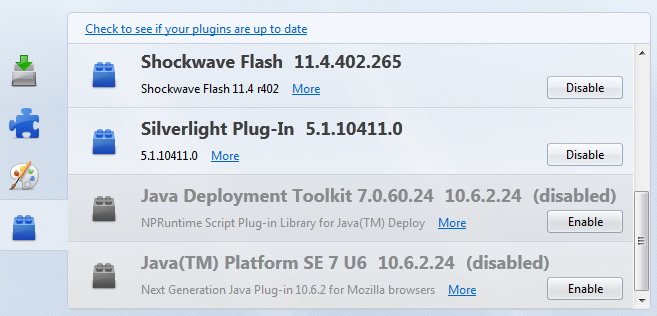
Go to Tools - Add-ons - Plugins

Look for Java Deployment Toolkit and/or Java Platform SE. Disable them all.


Java disabled in Firefox

Chrome

Go to WrenchSettings and Show advanced settings... - Privacy and Content settings - Plug-ins - Disable individual plug-ins... - Java - disable. It is quite difficult to find!

Java enabled in Chrome

Internet Explorer

Go to Tools - Manage Add-ons. Disable Java(tm) Plug-in SSV Helper and Java(tm) Plug-in 2 SSV Helper.


Java disabled in Internet Explorer 9
Sources : 
  • http://research.zscaler.com/2012/08/are-you-vulnerable-to-latest-java-0-day.html
  • http://www.deependresearch.org/2012/08/java-7-0-day-vulnerability-information.html

Thursday, July 19, 2012

New VideoLAN (VLC) version 2.0.3

 The new VLC is out, but is only for mac  :-( .


Large Orange VLC media player Traffic Cone Logo
VideoLAN and the VLC development released VLC 2.0.3, this update mainly targets the Mac OS X platform. Most improvements are for Mac OS X Mountain Lion, but also this update includes many bug fixes.


Finally,VLC Media Player 2.0.3 includes updates for 18 translations and adds support for Uzbek and Marathi. Bugs preventing the activation of the Gaelic and Thai translations in the earlier version were resolved.


Official Downloads of VLC media player


Windows
Get VLC for Windows
Get VLC for Mac OS X
Get VLC for iOS

Sources

You can also directly get the source code.

GNU/Linux
Get VLC for Debian GNU/Linux
Get VLC for Ubuntu
Get VLC for Mint
Get VLC for openSUSE
Get VLC for Gentoo Linux
Get VLC for Fedora
Get VLC for Arch Linux
Get VLC for Slackware Linux
Get VLC for Mandriva Linux
Get VLC for ALT Linux
Get VLC for Red Hat Enterprise Linux

Other OS
Get VLC for FreeBSD
Get VLC for NetBSD
Get VLC for OpenBSD
Get VLC for Solaris
Get VLC for Android
Get VLC for QNX
Get VLC for Syllable
Get VLC for OS/2

Monday, July 16, 2012

Apps uninstaller OS X

http://www.freemacsoft.net/images/ribbon.pngUnlike Windows or Linux the automatically installed applications, can be uninstalled. Unless they are compiled in the case of Linux.

 But in OS X, it does not. There is no installer or apt-get or yum, or something similar.
And to remove an installed application, is not so easy. You must delete the application, system files and records used by application and user files from the application itself.


Fortunately there are applications made ​​by developers who do not belong to Apple, and that are free. And I hereby present AppCleaner from FreeMacSoft.


AppCleaner is a small application which allows you to thoroughly uninstall unwanted apps.

Installing an application distributes many files throughout your System using space of your Hard Drive unnecessarily.

AppCleaner finds all these small files and safely deletes them.


Simply drop an application onto the AppCleaner window. It will find for the related files and you can delete them by clicking the delete button.

Requirements: Mac OS X 10.4+

Download:

Saturday, July 14, 2012

Mac OS X 10.6.8 on EeePC 1000h

After several, but even huge attempts. Finally I managed to successfully install Mac OS X 10.6.8 on EeePC 1000h.

Just got it to work with a clean installation. I installed 10.6.3, then updated directly to 10.6.7 without kernel hack / Pacht. Only in 10.6.8 is that I had to install the Kernel Hack.

As a result, everything works 100%. Sound, Wifi, FN keys on the keyboard, Apple Mac Store.


The only problem is that is slow in terms of work, even with maximum RAM, 2GB. Not so fast compared to Linux or Windows XP. But it's faster than Windows Vista. :-)

When comparing the speed  WIndows 7 and Mac OS X 10.6.8. The result is the same.


EeePC: 1000h with Mac OS X 10.6.3 Snow Leopard

 EeePC: 1000h with Mac OS X 10.6.8 Snow Leopard


Unfortunately I will not explain how I did. I will create a tutorial and explain the new post. Because, a simply mistake and you need to do it again.  Unless you always make a backup of Kext and again by hand.

Wednesday, July 11, 2012

JPG To PDF Converter for Mac for Free

JPG To PDF Converter for Mac
Converts images files to PDF documents and contracts on Mac OS X. With this app, now Mac users can easily create PDF files from JPG, TIFF, PNG, BMP and GIF image files.

Creates PDF documents from image files that you select. Simply drag and drop your images and photos onto the application, and click Convert Now button to start the task. If you want to change the page sequence, simply click the Move Up or Move Down buttons, or drag the image path and drop to the correct row.


With JPG To PDF Converter for Mac, You can easily produce PDF eBooks from image materials, and create PDF contract from scanned images & photos.But the main draw back of this application is, it can convert single-page TIFF format images to PDF documents, but CANNOT convert the Multi-page TIFF Image to PDF format.

Supported Formats: JPG (JPEG), TIFF (TIF), BMP, PNG, GIF.
Requirement: Mac OS X 10.7 or Later

How to Use ?
Download and open the DMG file from below link, drag and drop the application out and Run. Simply drag and drop image files onto the converter, set the output path and click Convert Now button.

Features & Benefits of JPF To PDF Converter for Mac :

  1. Easy to Use : Simply Drag and Drop Images and Click Convert Now Button to Start the Conversion. 
  2. Fast Conversion : Converts Hundreds of Images to PDF Documents in Few Seconds. 
  3. Make Contract Easily : You can Make PDF Contract from Photos or Scanned Images. 
  4. Image Formats: Supports Most Popular Image Formats like JPG, TIFF, BMP, PNG and GIF.

JPF To PDF Converter for Mac Giveaway :

Now users can get free license of JPG to PDF Converter for Mac to convert JPG, TIFF, PNG, BMP and GIF images to PDF documents during this 15-day giveaway period, the giveaway will be closed on July 20th, 2012. Normally this software is priced at $29.95.

JPF To PDF Converter for Mac Serial/license Code : JPG2PDFMAC886927590123

Download : JPF To PDF Converter for Mac v1.0

Read more: http://www.techno360.in/jpf-to-pdf-converter-for-mac-for-free/#ixzz20Las1prU
Under Creative Commons License: Attribution Non-Commercial Share Alike

Tuesday, July 3, 2012

Hackintosh Asus A8Js Snow Leopard 10.6.3 and Update 10,6.7

I have laptop Asus A8Js since 2006, I have laptop Asus A8Js since 2006, and is still running. And even better than some new portable (in terms of work, not for video games).
 
 In A8Js I use as a base operating system Fedora Linux, and is quite stable and fast. A major advantage of using Linux instead of Windows, is that I can work better with a more OfficeLibre and fluidity. Windows always has a rule to consume resources, even if it is not doing anything, always has a feature to consume the CPU. On Linux I end / set all kinds of services and resources. In Windows there may be services that can not turn off, even temporarily.

What wee need:

  • Mac OS X Snow Leopard Install DVD (I use Snow Leopard 10.6.3)
  • BootCD  I recommend iBoot Legacy. Tge BootCD is to be able to read and recognize the mac partition system. The installation DVD is a system that is only used by Mac
  • Blank CD to burn iBoot.
  • Patience
Working:
  • Bluetooh             (no kext needed)
  • Ethernet              (no kext needed)
  • Sound                 (kext: voodoohda - High Definition Audio (HDA) )
  • Sleep/Hibernate (kext:  SleepEnabler.kext)
  • Keyboard
  • DVD
  • USB ports
  • USB  Keyboard
  • USB Mouse
Not Working:
  • Wireless  (I do not bother to look for the kext)
  •  Touch pad (i use a usb mouse)
Not tested:
  • WebCam
  • Mic
Before i begin, i remove any usb peripherals besides keyboard and mouse. It was not necessary to change anything in bios.

I turned on the computer with the iBoot. I waited to start the boot. I removed the iBoot and insert the DVD installation of OS X. And pressed the F5 button to search for new units iBoot (usb / dvd).

I chose the installation dvd. Without entering any special commands in iBoot.

I waited to start the installation, and follow the steps that were required in the installation by the end of the installation. And the installation went without any problems, or kernel panic.


After creating the user the first thing I did was turn off automatic updates. Because the update damages the hackintosh.

The second was install multibeast. The option I chose in the installation was EasyBeast, which installs what is needed.

 EasyBeast is a DSDT-free solution for any Core/Core2/Core i system. It installs all of the essentials to allow your system to boot from the hard drive. Audio, Graphics and Network will have to be enabled separately.


After installing multibeast installed the Kext for sound, and solve the problem of sleep and off correctly.

My laptop running 10.6.3


A8Js Snow Leopard 10.6.3

Update Snow Leopard 10.6.3 for Snow Leopard 10.6.7

After successfully installing the 10.6.3 update I chose install combo update 10.6.7.

Updates on hackintosh should never be made automatically. You should download the combo update and do the update manually.


What wee need:
Working:
  • Bluetooh             (no kext needed)
  • Ethernet              (no kext needed)
  • Sound                 (no kext needed)
  • Sleep/Hibernate (kext for 10.6.7:  SleepEnabler.kext)
  • Keyboard
  • DVD
  • USB ports
  • USB  Keyboard
  • USB Mouse
Not Working:
  • Wireless  (I do not bother to look for the kext)
  • Touch pad (i use a usb mouse)
Not tested:
  • WebCam
  • Mic 
  •  
After doing the update manually, never, never go RESET. 
  1. Reinstall multibeast 
  2. Reinstall Kext. On my Asus, I had to install dedicated SleepEnabler.kext version 10.6.7
tonymacx86 MultiBeast demo


And finally restarted the Laptop and it's all working.


10.6.8 Working whit Mac Apple Store
Asus A8Js Snow Leopard 10.6.7

 Update Snow Leopard 10.6.7 for Snow Leopard 10.6.8

This update will be for another day. Because the kernel and kext 10.6.8 Snow Leopard suffered a lot of changes.

And for this reason at the hard drive, I will create a partition for testing, re-install Snow Leopard on this partition, and test the update and find out what are the kext I have to change and if I have to put a kernel with patches.

Monday, July 2, 2012

Run Android Apps on Windows and Mac with BlueStacks

BlueStacks_App_Player_for_Windows_7_PC_and_Tablet

Now with BlueStackswe can run Android aps on Windows and Mac. 


But note that this application is not yet in its final phase. I oportinidade testing on Mac OS X Snow Leopard 10.6.7. And can not run any app from Android.


Windows Version:  App Player
BlueStacks App Player lets you run your Android apps fast and full screen on Windows PCs and tablets. Alpha testing recently ended, but you can sign up to be a beta tester. Join people in more than 100 countries who are using BlueStacks to run apps like Pulse, Advanced Task Killer and Alchemy full screen.


Mac Version
The Mac version it is available for download, but is not yet a final version.


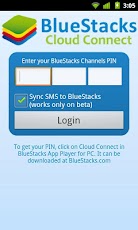
Cloud Version: Cloud Connect
Sync Android Apps from your phone or tablet to BlueStacks using our Cloud Connect mobile app.


For more info you can visite the web site: http://bluestacks.com

More about Mac OS X and Hackintosh


To understand more about the OS, I've compiled a few basics that is fundamentel for Hackintosh. Hope you enjoy.

What is a kernel ? 
A kernel is in short terms the “core” of the operating system. It controls basically all low level operating functions. Kernels exist in all Linux and UNIX based systems, including Mac OS X. In Mac OS X the kernel is located in the root of your hard drive (/) and is named “mach_kernel” by default. 


What is kext ?
Kext is a particular driver for OS X Kernel, is a kernel extension (kext). They’re generally used for device drivers and other things that needs to run in the kernel (OS core) environment. 

All drivers/kext are installed to '/System/Library/Extensions/'.  The driver allow for extra hardware support and and in the case of Hackintosh, to replace Appleʼs original drivers with ones that are optimized for use on PCs. 

At boot time the relevant kext are uploaded from Extensions.mkext this is a cache folder that contains kext related to the installed hardware. If you loves your hackintosh then take a full backup of your kexts because some kexts may disappear after the update procedure.

They’re not the same as classic Mac OS extensions, as many of the things that classic Mac OS extensions did are done differently in Mac OS X.Since kernel extensions aren’t protected by Mac OS X’s memory protection, developers are encouraged to stay away from writing them unless they absolutely have to. Even then, Mac OS X can dynamically load them, so chances are you’d rarely have to add anything to Mac OS X’s Extensions folder.


What is DSDT ?
DSDT is a part of ACPI. Actually DSDT tells OS how to interract with the hardware (simplified way of telling it). OSX has an incomplete ACPI implementation which supports only a subset of DSDT. By replacing DSDT we can declare essentially the same interface but in the way that OSX understands. This potentially can solve nearly any ACPI-related problem (except if OSX bypasses ACPI). Other usage case is emulating by the means of DSDT features or hardware components not present on your system. But this is limited to devices that use ACPI.

What is DSDT patching? 
This is an area very rarely delved into, and is something that some of even the most experienced users dare not venture. In reality, its not dangerous, it just can be painfully hard at times. DSDT is a table found in your computerʼs BIOS that controls ACPI (power, time, etc.) functions. Starting at OS X 10.5.6 Apple decided to start checking for faulty DSDTs when it boots. Obviously the PCs DSDT comes back as faulty so it will not boot. The only way to counteract this is to make a dump of the DSDT in the BIOS and patch it properly.  

DSDT pacht:
  1. You need a modified bootloader that will support DSDT override.
  2. You need a patched DSDT file that will be copied to / dsdt.aml. 
  3. To create DSDT dumps you can use the DSDT Patcher (also included in the Extras folder) but this is an advanced method, and often UOI plugins will include a DSDT file that you can install easily with this installer. However beware, even if you have the same motherboard DSDTʼs can vary by BIOS version so try to make sure that you have the same BIOS version as what is specified in the plugin.

Difference between SMC & RTC ?
The SMC is basically System Management Controller. By resetting the SMC you can resolve some computer issues such as not starting up, not displaying video, sleep issues, fan noise issues, and blah-2. While The Real Time Clock (RTC) is a chip on the logic board that controls the date and time functions of the computer. If the computer is experiencing a booting issue, resetting the RTC may resolve it.

What is a vanilla compatible system ?
A vanilla compatible system is a computer capable of running OS X with minimal modifications (no patched kernel, compatible with Apple software updates). You have a vanilla capable system if you have a Core 2 based processor. 

What is EFI emulation ?
EFI is the Extensible Firmware interface found in real macs. EFI is basically the “BIOS” of a Mac. For a computer to be properly recognized as a mac and to have the most compatibility it must have EFI. The problem here is that PCs do not have EFI. Developers have counteracted this problem by using EFI emulation which enables basic EFI function calls through a specially modified bootloader. 

Nearly all OSx86 installs have some form of EFI emulation installed, so this is not necessarily something to worry about. 

EFI emulation is required to use vanilla (unpatched) kernels and kexts, and to use GUID partition maps and EFI strings.


 Source’s PCWIZ , Insanelymac , Netkas , Leo4all, Vinay

Sunday, July 1, 2012

Hackintosh, What is Hackintosh? Using hackintosh?


What is Hackintosh?
Basically, the Hackintosh is to make operating system made ​​by Apple, working on computers (Desktop, Laptop and Netbook) that are not manufactured by Apple. That is running the operating system facilities that are not Apple-branded.

Is hackintosh legal ?
Let's see the "SOFTWARE LICENSE AGREEMENT FOR MAC OS X".
Single Use, Family Pack and Leopard Upgrade Licenses for use on Apple-branded Systems

2. Permitted License Uses and Restrictions.
A. Single Use License. Subject to the terms and conditions of this License, unless you have purchased a Family Pack or Upgrade license for the Apple Software, you are granted a limited non-exclusive license to install, use and run one (1) copy of the Apple Software on a single Apple-branded computer at a time. You agree not to install, use or run the Apple Software on any non-Apple-branded computer, or to enable others to do so. This License does not allow the Apple Software to exist on more than one computer at a time, and you may not make the Apple Software available over a network where it could be used by multiple computers at the same time.


We can make a backup of Mac OS X Snow Leopard Retail ?
Yes, we can. Let's see the "SOFTWARE LICENSE AGREEMENT FOR MAC OS X".
Single Use, Family Pack and Leopard Upgrade Licenses for use on Apple-branded Systems
F. You may make one copy of the Apple Software (excluding the Boot ROM code and other Apple firmware that is embedded or otherwise contained in Apple- branded hardware) in machine-readable form for backup purposes only; provided that the backup copy must include all copyright or other proprietary notices contained on the original. Apple Boot ROM code and firmware is provided only for use on Apple-branded hardware and you may not copy, modify or redistribute the Apple Boot ROM code or firmware, or any portions thereof.

One important note. We only have acquired the software, is not our. Only rented the Apple software. It is true and there are other companies doing the same thing, which is Sony Playstation.

SOFTWARE LICENSE AGREEMENT FOR MAC OS X".
Title and intellectual property rights in and to any content displayed by or accessed through the Apple Software belongs to the respective content owner. Such content may be protected by copyright or other intellectual property laws and treaties, and may be subject to terms of use of the third party providing such content. This License does not grant you any rights to use such content nor does it guarantee that such content will continue to be available to you.


What is needed to use/make/work with hackintosh ?

  1. A computer whit a Intel Processor. AMD is not compatible. Unless you use a hacked kernel. The google is our friend (sometimes).
  2. Original Retail Mac OS X (Please don't use pirate). An original version gives less trouble in the updates and installations. If you use a version of a team, always have to update with the update version of that team. Due to the changed files for it, such as kernel.
  3. Boot loader emulator CD. Use Iboot plus MultiBeast
  4. Patience and humility. Because not all hardware is compatible. And you can not run well the first time. It is a more try error.
Now I will not explain how to proceed with the installation. I'll explain in the following post.

The level of the question of illegality. I'm not using a copy but an original. So I'm not stealing anything Apple. And that's how everyone should do. Because it's a reasonably cheap price compared to the various versions of Microsoft operating systems.
 
Buy the original and do not use any copy.

From Fedora Linux to MAC OS X Snow Leopard 10.6.3

For more than four years that only work with the Linux Operating System on my personal computers (Desktop and Netbook). I have worked with Linux since Red Hat 5, which gave major headaches, due to lack of incompatabilidade with printers and other peripherals at the time.

 I tried other distros as:
  • Red Har 6.2
  • WinLinux 2000
  • Corel Linux
  • Red Hat 7.1
  • Red Hat 8
  • Fedora Core 1 - 4
  • Open-Suse
Linux OS CD from magazines
Full Linux CD from magazines


And I chose to use Fedora and Centos computers and laptops to servers. And to date I am realy satisfied. Because I have the freedom to customize my way and the variety of software is available free (free like a beer). Both on a personal level, as development and security.


Microsoft OS
Some of my Microsoft OS licenses of my computers
As is clear also I have to use Windows (at work and at home) because some applications that only exist in Microsoft systems. But do not use a dual-boot. I use virtual machines with Windows virtualized Oracle Virtual Box. That day is also free for domestic and business users due to VMWare (thanks VMWare).

Since I am working with the new Gnome 3, I'm hating Gnome. So I'll try it the Mac OS X. Because unlike Microsoft, Gnome, KDE, ... . The graphical environment keeps the same.


Worten Store Mac OS X

 And here begins my story with Apple Mac OS X Snow Leopard.
 
I had exprimentado MAC OS X 10.5. But I have not had much time to try it the operating system, a technical and personal level.
 
And then I went on a Saturday to buy an ORIGINAL RETAIL MAC OS X Snow Leopard 10.6.3 (not a copy or download from torrent), the store Worten. I bought a Family Pack for five computers.


The difference between a single and a family pack is none. Both are completely the same. Because there are no limitations of facilities, is just a legal issue. Because I want to install on multiple devices.


Mac OS X Apple Store


I came home with my Mac OS X Snow Leopard Retail 10.6.3.

That only cost 39.90 euros in the physical store.

 In Apple online store costs 59.00 euros.

Snow Leopard Family Pack
physical store (39,90) vs  Apple store (59,90)
physical store wins 


Mac OS X Snow Leopard prof
Package Mac OS X Snow Leopard 10.6.3 Retail

Inside package os Mac OS X Retail 10.6.3