Tuesday, July 10, 2012

Panda Security 2012 3 months trial


 Now you can test the Panda Security 2012 for 3 months trial.

Download: http://www.pandasecurity.com/vip/ap12

Activation code : AP12PVIP-98464158

Antivirus Comparison, February 2011
Test speed of analysis request (MB / s, higher is better)

Operation Systems:
  • Windows 7 (32 e 64bits)
  • Windows Vista (32 e 64bits)
  • Windows XP (32bits)

AntiVirus Trial (90 days to 1 year)

Now you can download promotional versions of major software today. Enjoy while you can, and choose your favourite security suite!

F-secure Internet Security 2011 (1 year): Not the last version, but since it can be updated frequently can detect the latest malware, no problem.

Titanium AntiVirus+ 2012 (1 year): Good antivirus, very thorough and efficient.

CA-Antivirus Plus (6 months): Complete suite with very pretty and pleasant interface.

Mcafee Antivirus Plus (6 months): Marketed by several companies and Internet service providers.

AVG Internet Security (90 days): Security suite that delivers comprehensive protection. But not perfect whit last mallware updates.

Bitdefender Total Security 2013 (90 days): This version includes features such as anti-theft USB Immunizer, Widget and detection system behavior.

BullGuard Internet Security (90 days): Despite not being a well-known suite is extremely effective and powerful.

Norton Internet Security 2012 (90 days): New version of one of the most popular security suites in the world.

Panda Internet Security (90 days): Known for pro-active protection efficient and constant updates.Like Avg not perfect whit last mallware updates.

Tuesday, July 3, 2012

Hackintosh Asus A8Js Snow Leopard 10.6.3 and Update 10,6.7

I have laptop Asus A8Js since 2006, I have laptop Asus A8Js since 2006, and is still running. And even better than some new portable (in terms of work, not for video games).
 
 In A8Js I use as a base operating system Fedora Linux, and is quite stable and fast. A major advantage of using Linux instead of Windows, is that I can work better with a more OfficeLibre and fluidity. Windows always has a rule to consume resources, even if it is not doing anything, always has a feature to consume the CPU. On Linux I end / set all kinds of services and resources. In Windows there may be services that can not turn off, even temporarily.

What wee need:

  • Mac OS X Snow Leopard Install DVD (I use Snow Leopard 10.6.3)
  • BootCD  I recommend iBoot Legacy. Tge BootCD is to be able to read and recognize the mac partition system. The installation DVD is a system that is only used by Mac
  • Blank CD to burn iBoot.
  • Patience
Working:
  • Bluetooh             (no kext needed)
  • Ethernet              (no kext needed)
  • Sound                 (kext: voodoohda - High Definition Audio (HDA) )
  • Sleep/Hibernate (kext:  SleepEnabler.kext)
  • Keyboard
  • DVD
  • USB ports
  • USB  Keyboard
  • USB Mouse
Not Working:
  • Wireless  (I do not bother to look for the kext)
  •  Touch pad (i use a usb mouse)
Not tested:
  • WebCam
  • Mic
Before i begin, i remove any usb peripherals besides keyboard and mouse. It was not necessary to change anything in bios.

I turned on the computer with the iBoot. I waited to start the boot. I removed the iBoot and insert the DVD installation of OS X. And pressed the F5 button to search for new units iBoot (usb / dvd).

I chose the installation dvd. Without entering any special commands in iBoot.

I waited to start the installation, and follow the steps that were required in the installation by the end of the installation. And the installation went without any problems, or kernel panic.


After creating the user the first thing I did was turn off automatic updates. Because the update damages the hackintosh.

The second was install multibeast. The option I chose in the installation was EasyBeast, which installs what is needed.

 EasyBeast is a DSDT-free solution for any Core/Core2/Core i system. It installs all of the essentials to allow your system to boot from the hard drive. Audio, Graphics and Network will have to be enabled separately.


After installing multibeast installed the Kext for sound, and solve the problem of sleep and off correctly.

My laptop running 10.6.3


A8Js Snow Leopard 10.6.3

Update Snow Leopard 10.6.3 for Snow Leopard 10.6.7

After successfully installing the 10.6.3 update I chose install combo update 10.6.7.

Updates on hackintosh should never be made automatically. You should download the combo update and do the update manually.


What wee need:
Working:
  • Bluetooh             (no kext needed)
  • Ethernet              (no kext needed)
  • Sound                 (no kext needed)
  • Sleep/Hibernate (kext for 10.6.7:  SleepEnabler.kext)
  • Keyboard
  • DVD
  • USB ports
  • USB  Keyboard
  • USB Mouse
Not Working:
  • Wireless  (I do not bother to look for the kext)
  • Touch pad (i use a usb mouse)
Not tested:
  • WebCam
  • Mic 
  •  
After doing the update manually, never, never go RESET. 
  1. Reinstall multibeast 
  2. Reinstall Kext. On my Asus, I had to install dedicated SleepEnabler.kext version 10.6.7
tonymacx86 MultiBeast demo


And finally restarted the Laptop and it's all working.


10.6.8 Working whit Mac Apple Store
Asus A8Js Snow Leopard 10.6.7

 Update Snow Leopard 10.6.7 for Snow Leopard 10.6.8

This update will be for another day. Because the kernel and kext 10.6.8 Snow Leopard suffered a lot of changes.

And for this reason at the hard drive, I will create a partition for testing, re-install Snow Leopard on this partition, and test the update and find out what are the kext I have to change and if I have to put a kernel with patches.

Monday, July 2, 2012

Run Android Apps on Windows and Mac with BlueStacks

BlueStacks_App_Player_for_Windows_7_PC_and_Tablet

Now with BlueStackswe can run Android aps on Windows and Mac. 


But note that this application is not yet in its final phase. I oportinidade testing on Mac OS X Snow Leopard 10.6.7. And can not run any app from Android.


Windows Version:  App Player
BlueStacks App Player lets you run your Android apps fast and full screen on Windows PCs and tablets. Alpha testing recently ended, but you can sign up to be a beta tester. Join people in more than 100 countries who are using BlueStacks to run apps like Pulse, Advanced Task Killer and Alchemy full screen.


Mac Version
The Mac version it is available for download, but is not yet a final version.


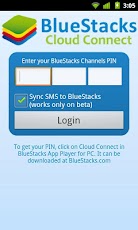
Cloud Version: Cloud Connect
Sync Android Apps from your phone or tablet to BlueStacks using our Cloud Connect mobile app.


For more info you can visite the web site: http://bluestacks.com

More about Mac OS X and Hackintosh


To understand more about the OS, I've compiled a few basics that is fundamentel for Hackintosh. Hope you enjoy.

What is a kernel ? 
A kernel is in short terms the “core” of the operating system. It controls basically all low level operating functions. Kernels exist in all Linux and UNIX based systems, including Mac OS X. In Mac OS X the kernel is located in the root of your hard drive (/) and is named “mach_kernel” by default. 


What is kext ?
Kext is a particular driver for OS X Kernel, is a kernel extension (kext). They’re generally used for device drivers and other things that needs to run in the kernel (OS core) environment. 

All drivers/kext are installed to '/System/Library/Extensions/'.  The driver allow for extra hardware support and and in the case of Hackintosh, to replace Appleʼs original drivers with ones that are optimized for use on PCs. 

At boot time the relevant kext are uploaded from Extensions.mkext this is a cache folder that contains kext related to the installed hardware. If you loves your hackintosh then take a full backup of your kexts because some kexts may disappear after the update procedure.

They’re not the same as classic Mac OS extensions, as many of the things that classic Mac OS extensions did are done differently in Mac OS X.Since kernel extensions aren’t protected by Mac OS X’s memory protection, developers are encouraged to stay away from writing them unless they absolutely have to. Even then, Mac OS X can dynamically load them, so chances are you’d rarely have to add anything to Mac OS X’s Extensions folder.


What is DSDT ?
DSDT is a part of ACPI. Actually DSDT tells OS how to interract with the hardware (simplified way of telling it). OSX has an incomplete ACPI implementation which supports only a subset of DSDT. By replacing DSDT we can declare essentially the same interface but in the way that OSX understands. This potentially can solve nearly any ACPI-related problem (except if OSX bypasses ACPI). Other usage case is emulating by the means of DSDT features or hardware components not present on your system. But this is limited to devices that use ACPI.

What is DSDT patching? 
This is an area very rarely delved into, and is something that some of even the most experienced users dare not venture. In reality, its not dangerous, it just can be painfully hard at times. DSDT is a table found in your computerʼs BIOS that controls ACPI (power, time, etc.) functions. Starting at OS X 10.5.6 Apple decided to start checking for faulty DSDTs when it boots. Obviously the PCs DSDT comes back as faulty so it will not boot. The only way to counteract this is to make a dump of the DSDT in the BIOS and patch it properly.  

DSDT pacht:
  1. You need a modified bootloader that will support DSDT override.
  2. You need a patched DSDT file that will be copied to / dsdt.aml. 
  3. To create DSDT dumps you can use the DSDT Patcher (also included in the Extras folder) but this is an advanced method, and often UOI plugins will include a DSDT file that you can install easily with this installer. However beware, even if you have the same motherboard DSDTʼs can vary by BIOS version so try to make sure that you have the same BIOS version as what is specified in the plugin.

Difference between SMC & RTC ?
The SMC is basically System Management Controller. By resetting the SMC you can resolve some computer issues such as not starting up, not displaying video, sleep issues, fan noise issues, and blah-2. While The Real Time Clock (RTC) is a chip on the logic board that controls the date and time functions of the computer. If the computer is experiencing a booting issue, resetting the RTC may resolve it.

What is a vanilla compatible system ?
A vanilla compatible system is a computer capable of running OS X with minimal modifications (no patched kernel, compatible with Apple software updates). You have a vanilla capable system if you have a Core 2 based processor. 

What is EFI emulation ?
EFI is the Extensible Firmware interface found in real macs. EFI is basically the “BIOS” of a Mac. For a computer to be properly recognized as a mac and to have the most compatibility it must have EFI. The problem here is that PCs do not have EFI. Developers have counteracted this problem by using EFI emulation which enables basic EFI function calls through a specially modified bootloader. 

Nearly all OSx86 installs have some form of EFI emulation installed, so this is not necessarily something to worry about. 

EFI emulation is required to use vanilla (unpatched) kernels and kexts, and to use GUID partition maps and EFI strings.


 Source’s PCWIZ , Insanelymac , Netkas , Leo4all, Vinay

Sunday, July 1, 2012

Hackintosh, What is Hackintosh? Using hackintosh?


What is Hackintosh?
Basically, the Hackintosh is to make operating system made ​​by Apple, working on computers (Desktop, Laptop and Netbook) that are not manufactured by Apple. That is running the operating system facilities that are not Apple-branded.

Is hackintosh legal ?
Let's see the "SOFTWARE LICENSE AGREEMENT FOR MAC OS X".
Single Use, Family Pack and Leopard Upgrade Licenses for use on Apple-branded Systems

2. Permitted License Uses and Restrictions.
A. Single Use License. Subject to the terms and conditions of this License, unless you have purchased a Family Pack or Upgrade license for the Apple Software, you are granted a limited non-exclusive license to install, use and run one (1) copy of the Apple Software on a single Apple-branded computer at a time. You agree not to install, use or run the Apple Software on any non-Apple-branded computer, or to enable others to do so. This License does not allow the Apple Software to exist on more than one computer at a time, and you may not make the Apple Software available over a network where it could be used by multiple computers at the same time.


We can make a backup of Mac OS X Snow Leopard Retail ?
Yes, we can. Let's see the "SOFTWARE LICENSE AGREEMENT FOR MAC OS X".
Single Use, Family Pack and Leopard Upgrade Licenses for use on Apple-branded Systems
F. You may make one copy of the Apple Software (excluding the Boot ROM code and other Apple firmware that is embedded or otherwise contained in Apple- branded hardware) in machine-readable form for backup purposes only; provided that the backup copy must include all copyright or other proprietary notices contained on the original. Apple Boot ROM code and firmware is provided only for use on Apple-branded hardware and you may not copy, modify or redistribute the Apple Boot ROM code or firmware, or any portions thereof.

One important note. We only have acquired the software, is not our. Only rented the Apple software. It is true and there are other companies doing the same thing, which is Sony Playstation.

SOFTWARE LICENSE AGREEMENT FOR MAC OS X".
Title and intellectual property rights in and to any content displayed by or accessed through the Apple Software belongs to the respective content owner. Such content may be protected by copyright or other intellectual property laws and treaties, and may be subject to terms of use of the third party providing such content. This License does not grant you any rights to use such content nor does it guarantee that such content will continue to be available to you.


What is needed to use/make/work with hackintosh ?

  1. A computer whit a Intel Processor. AMD is not compatible. Unless you use a hacked kernel. The google is our friend (sometimes).
  2. Original Retail Mac OS X (Please don't use pirate). An original version gives less trouble in the updates and installations. If you use a version of a team, always have to update with the update version of that team. Due to the changed files for it, such as kernel.
  3. Boot loader emulator CD. Use Iboot plus MultiBeast. 
  4. Patience and humility. Because not all hardware is compatible. And you can not run well the first time. It is a more try error.
Now I will not explain how to proceed with the installation. I'll explain in the following post.

The level of the question of illegality. I'm not using a copy but an original. So I'm not stealing anything Apple. And that's how everyone should do. Because it's a reasonably cheap price compared to the various versions of Microsoft operating systems.
 
Buy the original and do not use any copy.

From Fedora Linux to MAC OS X Snow Leopard 10.6.3

For more than four years that only work with the Linux Operating System on my personal computers (Desktop and Netbook). I have worked with Linux since Red Hat 5, which gave major headaches, due to lack of incompatabilidade with printers and other peripherals at the time.

 I tried other distros as:
  • Red Har 6.2
  • WinLinux 2000
  • Corel Linux
  • Red Hat 7.1
  • Red Hat 8
  • Fedora Core 1 - 4
  • Open-Suse
Linux OS CD from magazines
Full Linux CD from magazines


And I chose to use Fedora and Centos computers and laptops to servers. And to date I am realy satisfied. Because I have the freedom to customize my way and the variety of software is available free (free like a beer). Both on a personal level, as development and security.


Microsoft OS
Some of my Microsoft OS licenses of my computers
As is clear also I have to use Windows (at work and at home) because some applications that only exist in Microsoft systems. But do not use a dual-boot. I use virtual machines with Windows virtualized Oracle Virtual Box. That day is also free for domestic and business users due to VMWare (thanks VMWare).

Since I am working with the new Gnome 3, I'm hating Gnome. So I'll try it the Mac OS X. Because unlike Microsoft, Gnome, KDE, ... . The graphical environment keeps the same.


Worten Store Mac OS X

 And here begins my story with Apple Mac OS X Snow Leopard.
 
I had exprimentado MAC OS X 10.5. But I have not had much time to try it the operating system, a technical and personal level.
 
And then I went on a Saturday to buy an ORIGINAL RETAIL MAC OS X Snow Leopard 10.6.3 (not a copy or download from torrent), the store Worten. I bought a Family Pack for five computers.


The difference between a single and a family pack is none. Both are completely the same. Because there are no limitations of facilities, is just a legal issue. Because I want to install on multiple devices.


Mac OS X Apple Store


I came home with my Mac OS X Snow Leopard Retail 10.6.3.

That only cost 39.90 euros in the physical store.

 In Apple online store costs 59.00 euros.

Snow Leopard Family Pack
physical store (39,90) vs  Apple store (59,90)
physical store wins 


Mac OS X Snow Leopard prof
Package Mac OS X Snow Leopard 10.6.3 Retail

Inside package os Mac OS X Retail 10.6.3